Intro
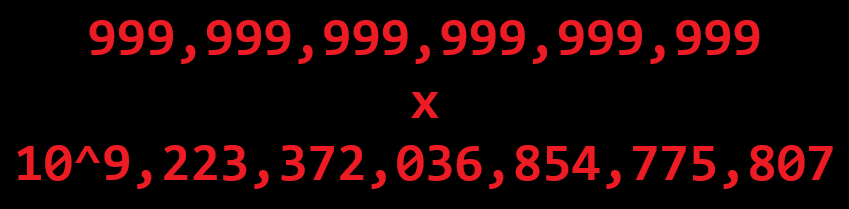
I “play” a lot of idle games. Meaning I watch numbers get bigger on my other monitor and sometimes press the reset button. Some of these games have REALLY big numbers, so big that even a 64-bit double can’t handle them. Other games explicitly make the double limit (1.79e308) a major reset layer. While some never even get close to those values. The design decisions behind these values is interesting but what I find even more interesting is the large numbers themselves.
IEEE 754 provides us with some nice floating point formats, however, these formats dedicate most of their bits to the significand (the part before the exponent). While this is great for more reasonable applications, flashy huge video game numbers aren’t reasonable. An octuple precision float (256-bits) has a limit of 1.61e78913, far too little for the idle game player.
Another pain often experienced by gamers (and programmers) is quantization error. If you’ve ever seen something silly like having 0.100000001 coins (or whatever) you’ve experienced this issue. This stems from IEEE 754 floats being base 2, which for complicated math reasons means 0.1 can’t be represented exactly. A solution to this is to use base 10. I fibbed a bit when saying IEEE 754 floats are base 2, there exist IEEE 754 formats with a base of 10! Except they aren’t exactly well supported…
The Spec
My new floating point format, “Trevor’s Rather Awful, Shoddy, and Horrible floats” (TRASH for short), is defined as follows:
- The base is 10.
- Rather than 15.95, the significand has 18 decimal digits of precision.
- A significand must always be between $10^{18} - 1$ and $10^{17}$ (inclusive)
Unless the significand is 0, then the exponent and significand are 0. - Signed 64-bit integer the exponent is.
- However, unused bits may be used for whatever you want.
Why???
The math is a bit easier to comprehend. Also 0.1 can be represented exactly See Intro.
R: a 64-bit integer can comfortably hold 18 digits and we only waste a few bits.
Another bad thing about floats is some have multiple ways to represent the same number. By forcing this range there is exactly one representation for each number. I don’t want bith 1e1 and 10e0 to exist.
Surely 9 quintillion is enough. Also typical integers are easier to work with.
Haven’t decided what to use these for, as 2. mentions some bits are wasted.
1. Aside: A friend once told me the human brain works in base 68 (or something like that, the number doesn’t matter). Disregarding that this is complete nonsense I’d argue it’s probably 10. This was well before generative AI was mainstream or capable of tricking people, I’m not sure where he got this idea.
Fixed or Fluctuating
Arbitrary precision representations can represent huge numbers, in fact, they could theoretically represent any real number. But this comes at a huge cost of space and speed. In calculations you need to keep track of EVERY digit. Imagine you’re doing long division in school and the teacher gives you some ridiculous expression like 2.308e308 / (pi to 10000 digits); it’d take a really long time to do that. Using a fixed precision has limits to the numbers you can represent but the speed and space cost is constant. Instead of pi to 100000 digits you’re allowed to truncate to something like 5 digits; it’d take a lot less time to do that. Since my use case isn’t scientific or financial, fudging the numbers like that is more than reasonable. (and we’ll have a lot more than 5 digits of precision)
Floating Point Math
This is where the real meat and potatoes of the article is. Higher education always talks about how an IEEE 754 float is represented but none of them talk about how the math between these numbers is actually done. Keep in mind I’m presenting one possible implementation, this is not an article about how the FPU actually works or even IEEE 754.
I also decided to make (almost) everything constexpr, so now I can use pow before C++26 gets proper support! {Comments about Apple removed for your sake}
Conversions =
Converting existing numbers to the TRASH format is extremely important, otherwise we couldn’t do anything! Lets start with the simple case: integers.
But before we talk about that, I need to mention a few very important subroutines. correct_exponent, ilog10, and ipow10. correct_exponent is how we satisfy 3. in the spec, the idea is that if value (our significand) is not in that range we shift it by tens until it is. But shifting by 10 a bunch is slow so we need to know how much to shift it. That’s where ilog10 comes in, given an integer we want to calculate $\lfloor log_{10}(i) \rfloor$. You could use std::log10 for this but that’s not constexpr! So instead I calculated the integer log2, approximated dividing by $log_2(10)$ to change the base, then used a power of ten look up table to correct the approximation. The stack overflow article I got the idea from is linked in references. ipow10 is quick, I just use a power of ten look up table. Now we can finally talk about correct_exponent. So if our value is 0, then exponent is always 0. If $|x| >= 10^{18}$ we need to divide x by 10 and increase the exponent by 1 (because of 64-bit maximum this is guarenteed to happen at most once). If $|x| < 10^{17}$ we need to multiply by 10s until we get there. How many tens? 17 - ilog10(|x|)! We handle the exponent overflowing like all other programmers handle overflow. Ignoring it until it becomes a problem :)
The full code for this subroutine looks like this:
constexpr void correct_exponent() noexcept {
	if (this->value == 0) {
		this->exponent = 0;
		return;
	}

	int64_t absVal = this->value < 0 ? -this->value : this->value;
	if (absVal >= ipow10(18)) {
		this->value /= 10;
		++this->exponent;
	}
	else if (absVal < ipow10(17)) {
		int64_t delta = 17 - ilog10(absVal);
		this->value *= ipow10(delta);
		this->exponent -= delta;
	}
}
With this, converting from an integer is as easy as:
(I omitted some code regarding handling overflow from uint64_t)
template <std::integral T>
constexpr TRASH(T value) noexcept:
	value(value), exponent(0) {
	correct_exponent();
}
Since we are dealing with massive numbers I also want to convert from scientific to this, so here’s that.
template <std::integral T>
constexpr TRASH(T value, int64_t exponent) noexcept:
	value(value), exponent(exponent) {
	correct_exponent();
}
Next is handling IEEE 754 floating point numbers. I’m sure there is some fancy trick to do this in something stupid like 3 instructions but I’m too lazy to do all that. We’re going to use the existing floating point functions to do this. However, that does mean that this is the only non-constexpr function in the entire article :(
template <std::floating_point T>
TRASH(T f) {
	if (f == 0.0) {
		return;
	}

	T positive = std::abs(f);
	this->exponent = static_cast<int64_t>(std::log10(positive) - 17);

	positive /= std::pow(10, this->exponent); // this could be ipow10
	this->value = static_cast<int64_t>(std::trunc(positive));
	if (f < 0.0) {
		this->value = -this->value;
	}

	correct_exponent();
}
Addition +
Addition isn’t too hard with these numbers, the only thing we need to be careful of is different exponents and overflow. To account for different exponents we’ll scale the smaller input to the same exponent as the larger input. Something to note is that if the smaller input is much smaller ($10^{18}$ times smaller) it will be reduced to 0. This is one of the many inaccuracies of floating point. However, nobody is going to notice the difference between $10^{18}$ and $10^{18} + 1$. The code for increasing the exponent looks like this:
constexpr TRASH increaseExponent(int64_t newExponent) const noexcept {
	TRASH out = *this;

	out.exponent = newExponent;
	int64_t delta = newExponent - this->exponent;
	if (delta > 18) {
		out.value = 0;
	}
	else {
		out.value /= ipow10(delta);
	}
	return out;
}
Since our range of values will always fit inside an int64_t when added together we can ignore overflow, correct_exponent will handle getting things back into range.
constexpr MixedPoint& operator+=(const MixedPoint& other) noexcept {
    // 0 needs special handling since exponent always == 0
	if (other.value == 0) {
		return *this;
	}
	else if (this->value == 0) {
		*this = other;
		return *this;
	}

	if (other.exponent <= this->exponent) {
		this->value += other.increaseExponent(this->exponent).value;
	}
	else {
		this->value = other.value + this->increaseExponent(other.exponent).value;
		this->exponent = other.exponent;
	}

	correct_exponent();
	return *this;
}
Subtraction -
Did you know that subtraction is actually addition in disguise? To negate a TRASH floating point number all you need to do is -value. Then do $a + -b$ for the actual subtraction.
Multiplication *
Multiplication would be easy if 128-bit integers were supported by the C++ standard, instead we get to use a cool trick to keep everything within 64-bits. The idea behind this is that we can represent each value as $high \cdot 10^9 + low$ (we’re using $10^9$ since it lets our highs be multiplied together without overflowing). Then our equation goes from $v = a \cdot b$ to $v = (a_{high} \cdot 10^9 + a_{low})(b_{high} \cdot 10^9 + b_{low})$. Expand that and we’re left with the following equation:
$$ v = a_{high}b_{high} \cdot 10^{18} + (a_{high}b_{low} + b_{high}a_{low}) \cdot 10^9 + a_{low}b_{low} $$
Notice how we’ve seperated the exponents? We can make use of our scientific notation constructor! Also keep in mind $10^x \cdot 10^y = 10^{x+y}$, I secretly factored the floating point exponent out of the equations to keep them looking cleaner.
constexpr TRASH& operator*=(const TRASH& other) noexcept {
    constexpr int64_t multiplyTruncation = ipow10(9);

	int64_t aHigh = value / multiplyTruncation;
	int64_t aLow = value % multiplyTruncation;

	int64_t bHigh = other.value / multiplyTruncation;
	int64_t bLow = other.value % multiplyTruncation;

    // handle the floating point exponent
	int64_t baseExponent = exponent + other.exponent;

	// purposely adding least to greatest for precision reasons
	value = aLow * bLow;
	exponent = baseExponent;
	correct_exponent();
	*this += TRASH{ aHigh * bLow + bHigh * aLow, baseExponent + 9 };
	*this += TRASH{ aHigh * bHigh , baseExponent + 9 + 9 };
	return *this;
}
Division /
Did you know that division is actually multiplcation in disguise? All you gotta do is a * 1/b. Wait, that didn’t help at all. Hmmmmmmmm, remember when I mentioned long division earlier? Yep, we’re going to use the same long division you learned way back in school for this. Something I realized after implementing this is that we were taught about modulo before college! (Not that college went in much depth either). We’re also going to use the fact that $10^x / 10^y = 10^{x-y}$. One little design decision I made is that dividing by zero results in zero, this is because I’m too lazy to think of a proper solution.
constexpr TRASH& operator/=(const TRASH& other) noexcept {
	if (value == 0 || other.value == 0) {
		value = 0; exponent = 0;
		return *this;
	}

	exponent -= other.exponent;

	int64_t result = value / other.value;
	int64_t remain = value % other.value;
	int64_t against = other.value;

	for (int i = 0; i < 17; ++i) {
		if (remain == 0) {
			break;
		}
        // go to next digit
		result *= 10;
		against /= 10;
		--exponent;

        // next division
		result += remain / against;
		remain %= against;
	}
	value = result;

	correct_exponent();
	return *this;
}
Comparisons <=>
Since we’ve decided that each number has exactly one representation comparisons are much easier! One thing to be aware of though is 0 having an exponent of 0. You could have 0 always have an exponent of -17 to make the comparisons even easier. The reason I didn’t do that is because I wanted 0 to be represented truely as 0, it’s more fun that way.
friend constexpr std::strong_ordering operator<=>(const TRASH& a, const TRASH& b) noexcept {
	if (a.value == 0) {
		return 0 <=> b.value;
	}
	if (b.value == 0) {
		return a.value <=> 0;
	}

	if (a.exponent < b.exponent) {
		return std::strong_ordering::less;
	}
	else if (a.exponent > b.exponent) {
		return std::strong_ordering::greater;
	}
	return a.value <=> b.value;
}
Rounding
To be honest, I almost never use round. floor or ceil always feel like a better choice when I need to round. So I didn’t implement round, but given the upcoming floor and ceil implementations I’m sure you could figure it out. We’re going to rely on good ‘ol integer division for this. The main question is what do we divide by?
If our exponent is $\leq 0$ then our value won’t be effected by rounding (the true decimal place is beyond our digit precision). If our exponent $\leq -18$ then our value is so small that it’s always going to be rounded to -1, 0, or 1. Otherwise we need to do some truncation. We’re going to use $10^{-exponent}$ as our truncator, this works since the exponent describes how much we’re moving our true decimal place left or right. The final part of these routines is to adjust the value depending on the rounding direction.
Floor
[[nodiscard]]
constexpr TRASH floor() const noexcept {
	if (this->exponent >= 0) {
		return *this;
	}
	if (this->exponent <= -18) {
        // small negatives become -1, not 0
		return { this->value < 0 ? -1 : 0 };
	}

	int64_t truncator = ipow10(-this->exponent);
	int64_t adjusted = (this->value / truncator) * truncator;

    // negative values round away from 0
	if (adjusted < 0 && adjusted != this->value) {
		adjusted -= truncator;
	}

	return { adjusted, this->exponent };
}
Ceil
[[nodiscard]]
constexpr TRASH ceil() const noexcept {
	if (this->exponent >= 0) {
		return *this;
	}
	if (this->exponent <= -18) {
		return { this->value < 0 ? 0 : 1 };
	}

	int64_t truncator = ipow10(-this->exponent);
	int64_t adjusted = (this->value / truncator) * truncator;

    // positive values round away from 0
	if (adjusted >= 0 && adjusted != this->value) {
		adjusted += truncator;
	}

	return { adjusted, this->exponent };
}
Modulo %
The division school never taught you properly! Modulo has some pretty awesome applications and identities, do research it for yourself. One of these identities is why I put this section after the round section. $$ a \bmod b = a - b \cdot \lfloor a / b \rfloor $$
We have all the operations to implement this without any funny business! Except division is slow so I’m going to introduce some funny business. Notice that if b > a then a / b is always 0, we’re going to take advantage of that to potentially avoid division. But things are a bit odd when the signs aren’t matching. When the signs are different we need to flip the comparison, a neat usecase for xor if I’ve ever seen one.
constexpr TRASH& operator%=(const TRASH& other) noexcept {
	auto order = other <=> *this;
	if (order == 0) { // handle a == b
		this->value = 0; this->exponent = 0;
		return *this;
	}

    // handle b > a
	if ((order > 0) ^ (this->sign() != other.sign())) {
		return *this;
	}

	*this -= other * (*this / other).floor();
	return *this;
}
Advanced Operations
These operations are significantly more complicated than the previous ones. So complex that we’re going to avoid actually calculating them entirely and rely on numerical approximations! Which approximation you choose depends on the error and performance characteristics you’re looking for. Unfortunately, an easy to understand approximation like a taylor series is a bad choice. There are too many operations and the error too great. The approximation we’re going to use is the Remez algorithm. This approximation is quick to compute and does great at minimizing error. Unfortunately, computing the coefficients to use in the polynomial is expensive and complicated. Also the approximation only works on intervals, we can’t use any arbitrary number as input…
The coefficient problem is easy to solve, only because they can be calculated offline and other people have done all of the work for us. I used a tool called Maple for this.
The interval issue is something we need to solve on a case-by-case basis. There are many tricks and math identities out there to use.
Log
Let’s start with something easy, ilog10 for our custom type. To avoid issues of undefined results, negative numbers are treated as positive and 0 returns 0. This makes ilog10 as easy as:
[[nodiscard]]
constexpr int64_t ilog10() const noexcept {
    return value == 0 ? 0 : exponent + 17;
}
Now the hard part, the fractional component of the log. We’re going to make use of $log_{10}(x + 10^y) = log_{10}(x) + y$ for this. This first part is relatively easy to follow, we’re going to remove the exponent part of our float using ilog10. This leaves us with a value in the range [1.0, 10.0). Now that we’ve got a sane range we could use Remez right here, except this range is still too large; the approximation would need a ridiculous amount of terms to get a reasonable error bound. So we’re going to further reduce the range using some evil math.
$$
j_n = 10^{n/10} \hspace{1cm}
n \in{ 0, 1, 2, \dots, 10} \hspace{1cm}
log_{10}(j_n) = 0.1n
$$
$$
n = \lfloor 10log_{10}(x) \rfloor \hspace{1cm}
1.0 \leq x \leq 10.0 \equiv j_0 \leq x \leq j_{10}
$$
$$
a = \frac{x}{j_n} \hspace{1cm}
\therefore j_0 <= a <= j_1 \equiv 1.0 \leq a \leq 10^{1/10}
$$
I’ll admit I’m not good at writing math, but the key element here is that $n$ is a finite integer. It technically doesn’t need to be between 0 and 10 but doing so makes it so we can avoid an extra floating point divison (or multiplication). Remember that dividing by 10 with our type is as easy as subtracting 1 from the exponent. One issue you probably noticed is that we need to divide by $j_n$ which is defined as 10 to a fractional power. We don’t have access to fractional powers (yet) so this is no good. Luckily since $n$ is a finite integer we can precalculate all possible values and utilize a lookup table to find $n$. Even better, we can precompute the reciprocal of $j_n$ to avoid a division. The actual range reduction looks like this:
...
constexpr std::array j{
	TRASH{1},
	TRASH{125892541179416721, -17}, // 10^1/10
	TRASH{158489319246111349, -17}, // 10^2/10
	TRASH{199526231496887960, -17}, // ...
	TRASH{251188643150958011, -17},
	TRASH{316227766016837933, -17},
	TRASH{398107170553497251, -17},
	TRASH{501187233627272285, -17},
	TRASH{630957344480193249, -17},
	TRASH{794328234724281502, -17}, // 10^9/10
	TRASH{10},
};
// reciprocal precomputation removed for simplicity

// note: at this point x has already been remapped to [1.0, 10.0)
uint32_t n = 0;
for (; n + 1 < j.size(); ++n) {
	if (x < j[n + 1]) break;
}
x /= j[n];

TRASH logJn{n, -1};
...
Now that our value is in a much smaller range our approximation will have much higher precision with significantly less terms. Again, the Remez coefficients were generated offline. Here’s the full thing
[[nodiscard]] // negative numbers work as if they were positive (0 always returns 0)
constexpr TRASH log10() const noexcept {
	if (this->value == 0) return 0;

    // the IEEE 754 conversion looks nicer but isn't constexpr friendly
    // and has quantization issues
	constexpr std::array j{
        TRASH{1},
        TRASH{125892541179416721, -17}, // 10^1/10
        TRASH{158489319246111349, -17}, // 10^2/10
        TRASH{199526231496887960, -17}, // ...
        TRASH{251188643150958011, -17},
        TRASH{316227766016837933, -17},
        TRASH{398107170553497251, -17},
        TRASH{501187233627272285, -17},
        TRASH{630957344480193249, -17},
        TRASH{794328234724281502, -17}, // 10^9/10
        TRASH{10},
    };

	constexpr auto invJ = [&j]() {
		std::decay_t<decltype(j)> out{};
		for (size_t i = 0; i < j.size(); ++i) {
			out[i] = TRASH{ 1 } / j[i];
		}
		return out;
	}();

    // remap to [1.0, 10.0)
	int64_t ilog10 = this->exponent + 17;
	TRASH x{ this->value >= 0 ? this->value : -this->value, -17 };

    // remap to [1.0, 10^1/10]
	uint32_t n = 0;
	for (; n + 1 < j.size(); ++n) {
		if (x < j[n + 1]) break;
	}
	x *= invJ[n];
	TRASH logJn{ n, -1 };

	// Remez algorithm [1, 10^1/10] to approximate mantissa
	// generated with Maple using:
    // `minimax(log10(x), x = 1 .. 10^1/10, 10, 1, 'maxerror')` (18 digits)
	// theoretical max error is around 1.821e-15, may be slightly larger in practice
	constexpr std::array<TRASH, 11> coefficients{
		TRASH{-122215493561194887, -17},
		TRASH{387044076498592176, -17},
		TRASH{-775587727877832188, -17},
		TRASH{122718016631259263, -16},
		TRASH{-143258249015752698, -16},
		TRASH{122240506361746277, -16},
		TRASH{-754031424704987048, -17},
		TRASH{327834199022210113, -17},
		TRASH{-954237461086014350, -18},
		TRASH{167096745973453202, -18},
		TRASH{-133229763806028993, -19},
	};

    // Horner's method to calculate the polynomial
	TRASH result = coefficients.back();
	for (size_t i = 1; i < coefficients.size(); ++i) {
		const auto& c = coefficients[coefficients.size() - 1 - i];
		result = c + result * x;
	}

    // add remapping terms
	result += ilog10;
	result += logJn;
	return result;
}
Now we can finally calculate a floating point log10! That’s cool and all but only having base 10 sucks. Luckily the change of base formula is here to save the day!
[[nodiscard]]
constexpr TRASH ln() const noexcept {
	// 1 / log10(e)
	constexpr TRASH invLe{ 2302585092994046, -15 };
	return this->log10() * invLe;
}
If we know the base we want to use ahead of time the cost is only one multiplication! Dynamic bases are possible but require a division and calculating the log10 of two numbers.
Pow ^
Again we’ll start simple, let’s only handle when the exponent is a whole number for now. This greatly simplifies things since we can compute the result with repeated multiplication and no evil approximations. But n multiplications is not ideal so we’re going to use a technique known as “Exponentiation by Squaring”. This takes advantage of the math identity: $b^{n} = (b^a)^{n/a}$, more information on the specifics can be found here. $a = 2$ to make things easy.
template <std::integral T> [[nodiscard]]
constexpr TRASH pow(T exp) const noexcept {
	if constexpr (std::is_signed_v<T>) {
        // b^-n = (1/b)^n
		if (exp < 0) {
			return (TRASH{ 1 } / *this).pow(-exp);
		}
	}
	if (exp == 0) {
		return 1;
	}
	if (exp == 1) {
		return *this;
	}

	TRASH result{ 1 };
	TRASH base { *this };
	while (exp > 0) {
        // check if odd
		if (exp % 2 == 1) {
			result *= base;
		}

		base *= base;
		exp /= 2;
	}
	return result;
}
Unlike repeated multiplication which scales linearly with n, this scales logarithmically (base 2) with n making it much quicker with larger values of n. We can augment this to work with our floating point type by flooring the exponent after every division, of course you have to make sure you have a whole number to begin with. One reason I started with log is that we’re going to use it in our pow implementation. Creating a Remez approximation for b^a is infeasible, two variables is too many. So we’re going to use another math trick,
$b^a = e^{aln(b)}$. This makes our base a constant so we only need to approximate e^x. Again we need to make sure x is in a small range for Remez to be effective. Yet another math trick, this time we’ll be splitting x into a fractional and whole component. Here’s the big math dump:
$$
b^a = e^{aln(b)} \hspace{1cm}
x = aln(b)
$$
$$
x = x_{whole} + x_{fract} \hspace{1cm}
x_{whole} = \lfloor x \rfloor \hspace{1cm}
x_{fract} = x - x_{whole}
$$
$$
e^{x_{whole} + x_{fract}} = e^{x_{whole}} * e^{x_{fract}}
$$
We’ve effectively split the computation into $e$ to a whole number (which we’ve already seen how to handle) and $e$ to a fraction in the range (-1.0, 1.0). This range is small enough to use with the Remez approximation. The full code has some edge cases it needs to handle but here it is:
[[nodiscard]] // returns 0 when base is negative and exp is not an integer
constexpr TRASH pow(TRASH exp) const noexcept {
    // 1^n = 1
	if (*this == 1) return *this;

    // 0^n = 0 except when n = 0
	if (*this == 0 && exp != 0) return *this;

    // lambda for exponentiation by squaring whole numbers
	auto calcWholeNum = [](TRASH base, TRASH whole) -> TRASH {
		if (whole == 0) {
			return 1;
		}
		if (whole == 1) {
			return base;
		}

		if (whole < 0) {
			base = 1 / base;
			whole = -whole;
		}

		TRASH result{1};
		while (whole > 0) {
			if (whole % 2 == 1) {
				result *= base;
			}

			base *= base;
			whole /= 2;
			whole = whole.floor(); // the floor is important!
		}
		return result;
	};

	// attempt whole number only exponent
	if (exp == exp.floor()) {
		return calcWholeNum(*this, exp);
	}
	else if (*this < 0) {
		// negative base to a non-integer exponent, abandon hope
		return 0;
	}

	// b^x = e^(xln(b))
	TRASH lnb = this->ln();
	exp *= lnb;

	// e^(a+b) = e^a * e^b
	TRASH whole = exp.floor();
	TRASH fract = exp - whole;

    // e^x_whole
	TRASH wholePart = calcWholeNum(TRASH{ 271828182845904524, -17 }, whole);

	// Remez algorithm (-1, 1) to approximate mantissa
	// generated with Maple using:
    // `minimax(exp(x), x = -1 .. 1, 12, 1, 'maxerror')` (18 digits)
	// theoretical max error is around 3.998e-14, may be slightly larger in practice
	constexpr std::array<TRASH, 13> coefficients{
		TRASH{100000000000000285, -17},
		TRASH{999999999999481873, -18},
		TRASH{499999999999757888, -18},
		TRASH{166666666681167750, -18},
		TRASH{416666666700941491, -19},
		TRASH{833333321739788130, -20},
		TRASH{138888887041076249, -20},
		TRASH{198413095528527369, -21},
		TRASH{248016353113237456, -22},
		TRASH{275507111351845966, -23},
		TRASH{275508560962091967, -24},
		TRASH{255790719526347827, -25},
		TRASH{213110584847839724, -26},
	};

    // Horner's method
	auto result = coefficients.back();
	for (size_t i = 1; i < coefficients.size(); ++i) {
		const auto& c = coefficients[coefficients.size() - 1 - i];
		result = c + result * fract;
	}

	result *= wholePart;
	return result;
}
With this we can finally do fractional powers. This also means we have things like square root! It’s a bit expensive to compute but oh well. We’ve officially implemented every possible math function (except sin, cos, tan, atan, acos, asin, sinh, cosh, tanh, asinh, acosh, atanh, etc.) I joke but most of these are the same idea as log and pow, reduce to a reasonable range for the function then approximate using something like Remez.
Closing
Since I implemented this for fun rather than a specific application it’s kindof a mess and poorly thought out (as well as unoptimized). If you want a good implementation of these same concepts there are many software defined floating point libraries out there. Or use your FPU like a normal person. But I might use this for something eventually, it’s kinda fun to have your own float type with comically large exponents.
The true source code can be found here or permalink (there are even tests if you can find them). It has several differences, mainly naming. I’m not happy with the name MixedPoint cause it implies it has any relation to fixed point which is untrue. Maybe I should call it TRASH ;)
References
*Desmos is great for visualizing math and making sure you don’t mess up your algebra too bad